Skip to content

Simulation Region Connector

The purpose of this region connector is to allow developers to debug their applications that integrate with EDDIE. It offers a few functionalities to send messages via EDDIE to the active outbound connectors.

DANGER

The simulation region connector should be turned off on production EDDIE instances
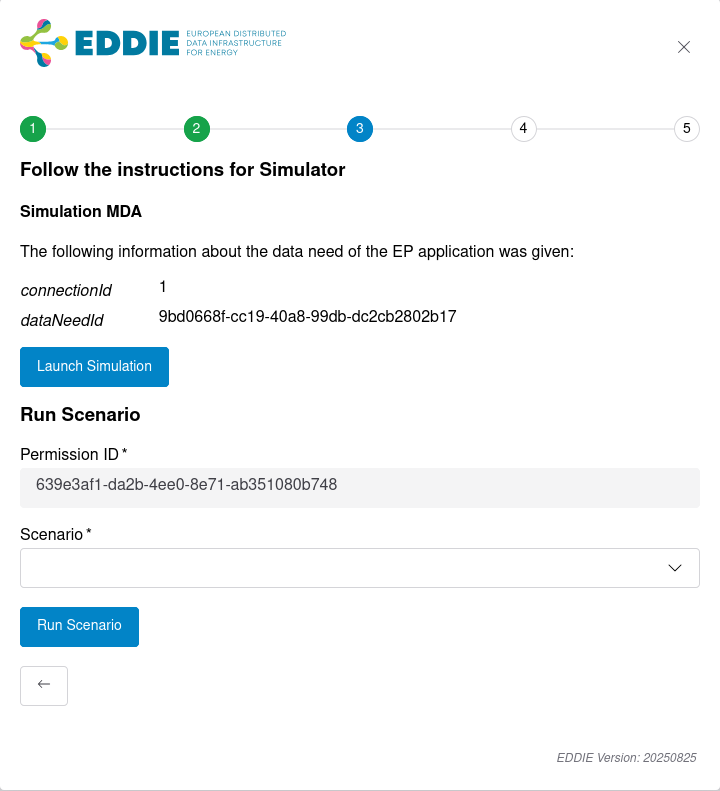
Image of the simulation region connector custom element

Configuration

To enable this region connector, the following configuration properties are required.

Configuration ValuesDescription
region-connector.sim.enabledtrue or false, false per default. Enables the region connector if set to true
region-connector.sim.scenariosSets the directory from which predefined scenarios should be loaded, prefix with classpath: to load the from the classpath. To load scenarios from the disk use a unix path, like /path/to/scenarios/. This should contain json files with the scenario. Can also be pointed to a single scenario file. Default is classpath:/scenarios/*.json. Wildcards are only supported when loading from classpath.
properties
region-connector.sim.enabled=true
region-connector.sim.scenarios=/path/to/scenarios/
yaml
region-connector:
  sim:
    enabled: true
    scenarios: /path/to/scenarios/
dotenv
REGION_CONNECTOR_SIM_ENABLED=true
REGION_CONNECTOR_SIM_SCENARIOS=/path/to/scenarios/

Launch Simulation

The simulation region connector offers a UI to send custom permission market documents and validated historical data to the outbound connectors. This allows developers to send singular messages via EDDIE to their application and see the resulting changes. To do this, click "Launch Simulation" in the simulation region connector element. You will be forwarded to another page where you can send custom status updates for a permission request, as well as custom validated historical data messages. The validated historical data will be published on the CIM topic and the custom status updates on both CIM and agnostic topics.
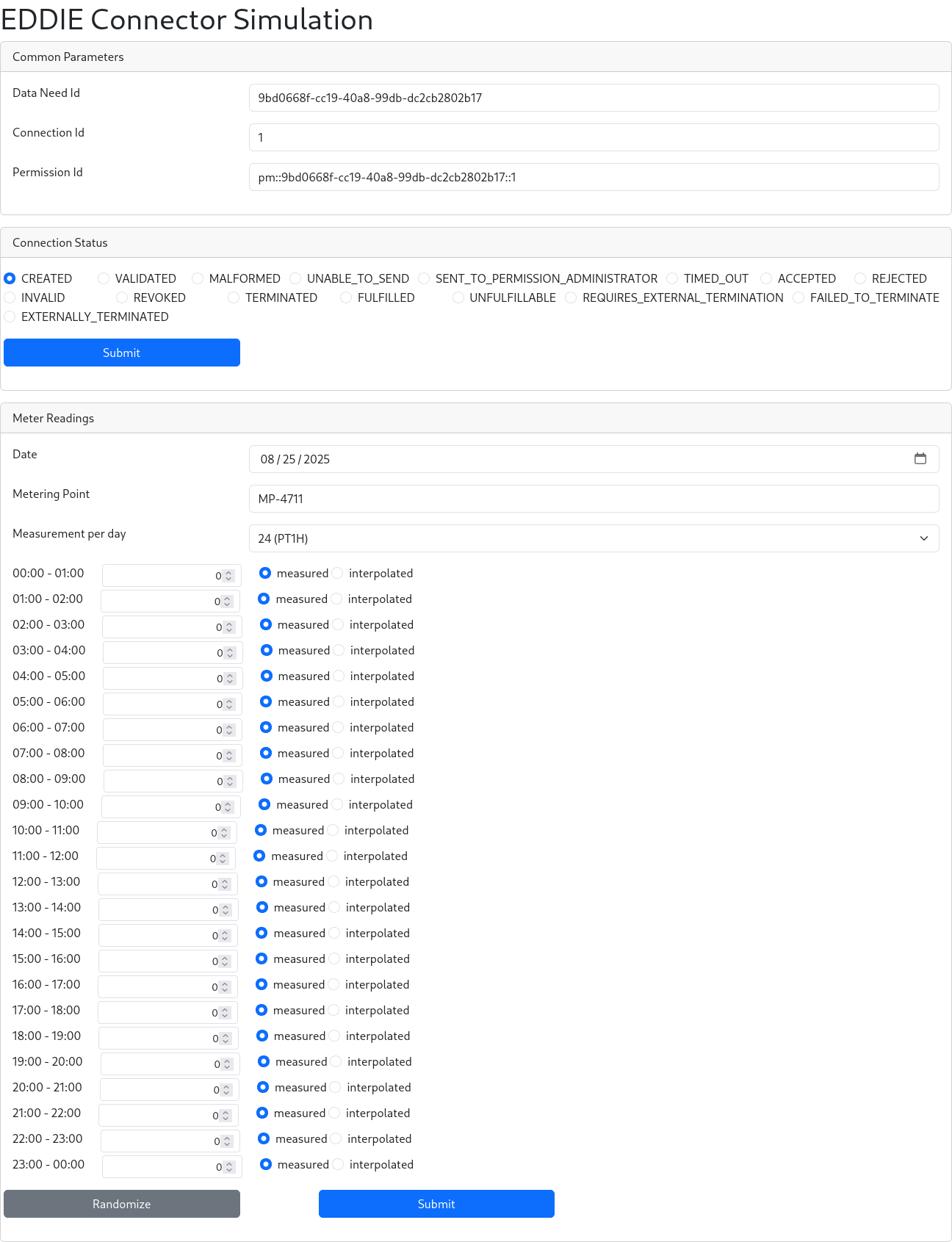
Image of the simulation page

Scenarios

The simulation region connector allows developers to run predefined scenarios, to see what kind of messages are produced at which point in the permission process model. The predefined scenarios are:

  • External Termination Scenario: Runs through the whole permission process model including the external termination.
  • Validated Historical Data Scenario: Runs through the permission process model, including fulfillment status. It also emits validated historical data after the accepted status.
  • Failed To Externally Terminate Scenario: Runs through the whole permission process model including the external termination, where it at first fails to externally terminate the permission request.
  • Unable To Send Scenario: Runs through the whole permission process model, including the failed to send status.

Scenario Model

A scenario is a JSON document with a name and an ordered list of steps. Every entry is deserialized by its type property, which has to match one of the step types described below. The following is a full example scenario:

json
{
  "type": "Scenario",
  "name": "Unable To Send Scenario",
  "steps": [
    {
      "type": "StatusChangeStep",
      "status": "CREATED",
      "delayInSeconds": 0
    },
    {
      "type": "StatusChangeStep",
      "status": "VALIDATED",
      "delayInSeconds": 0
    },
    {
      "type": "StatusChangeStep",
      "status": "UNABLE_TO_SEND",
      "delayInSeconds": 10
    },
    {
      "type": "StatusChangeStep",
      "status": "VALIDATED",
      "delayInSeconds": 0
    },
    {
      "type": "StatusChangeStep",
      "status": "SENT_TO_PERMISSION_ADMINISTRATOR",
      "delayInSeconds": 0
    },
    {
      "type": "StatusChangeStep",
      "status": "ACCEPTED",
      "delayInSeconds": 0
    },
    {
      "type": "StatusChangeStep",
      "status": "FULFILLED",
      "delayInSeconds": 0
    }
  ]
}

Scenario

This is the top level object in the JSON file and should not be nested.

PropertyDescription
type"Scenario"
nameA descriptive name of the scenario
stepsThe ordered list of steps to execute

StatusChangeStep

Emits a status update for the permission request on the CIM and agnostic topics, then waits for the configured delay before the next step is executed.

PropertyDescription
type"StatusChangeStep"
statusThe status to emit, one of the PermissionProcessStatus values: CREATED, VALIDATED, MALFORMED, UNABLE_TO_SEND, SENT_TO_PERMISSION_ADMINISTRATOR, TIMED_OUT, ACCEPTED, REJECTED, INVALID, REVOKED, TERMINATED, FULFILLED, UNFULFILLABLE, REQUIRES_EXTERNAL_TERMINATION, FAILED_TO_TERMINATE, EXTERNALLY_TERMINATED
delayInSecondsTime in seconds to wait after emitting the status, must be 0 or more
json
{
  "type": "StatusChangeStep",
  "status": "ACCEPTED",
  "delayInSeconds": 10
}

ValidatedHistoricalDataStep

Emits a validated historical data message on the CIM topic.

PropertyDescription
type"ValidatedHistoricalDataStep"
meterReadingThe validated historical data to emit

The meterReading object has the following properties:

PropertyDescription
startDateTimeStart of the measurement period, an ISO 8601 timestamp in UTC, e.g. 2024-12-30T09:49:05.458Z
meteringPointIdentifier of the metering point
meteringIntervalISO 8601 duration between measurements, e.g. PT15M
measurementsList of measurements, each with a value and a measurementType of MEASURED or EXTRAPOLATED
json
{
  "type": "ValidatedHistoricalDataStep",
  "meterReading": {
    "startDateTime": "2024-12-30T09:49:05.458Z",
    "meteringPoint": "mid",
    "meteringInterval": "PT15M",
    "measurements": [
      {
        "value": 10.0,
        "measurementType": "MEASURED"
      }
    ]
  }
}

TerminationInteractionStep

Waits for a termination of the permission request by the eligible party for up to the configured duration. If a termination is received, the TERMINATED status is emitted and the scenario continues. If no termination is received within that time, the scenario fails.

PropertyDescription
type"TerminationInteractionStep"
waitForHow long to wait for the termination, as an ISO 8601 duration, e.g. PT5M
json
{
  "type": "TerminationInteractionStep",
  "waitFor": "PT5M"
}

LoadProfileCurveStep

Generates validated historical data for the last ten days from the standard load profiles and emits them on the CIM topic. The generated measurements are all of type MEASURED and their values are the profile values scaled by maxEnergy.

PropertyDescription
type"LoadProfileCurveStep"
meteringPointIdentifier of the metering point
meteringIntervalISO 8601 duration between measurements, e.g. PT15M
maxEnergyThe peak energy value the generated curve is scaled to
defaultProfileProfile used for weekdays that are not listed in profilesPerWeekday
profilesPerWeekdayOptional map of weekday (MONDAY to SUNDAY) to profile name

The available standard profiles are: All daytime, Early morning & evening, Mid morning, Midday peak, Late afternoon, Evening, Midday trough.

json
{
  "type": "LoadProfileCurveStep",
  "meteringPoint": "mid",
  "meteringInterval": "PT15M",
  "maxEnergy": 10.0,
  "defaultProfile": "Early morning & evening",
  "profilesPerWeekday": {
    "SATURDAY": "All daytime",
    "SUNDAY": "All daytime"
  }
}

Constraints

Scenarios are validated before they are executed, and invalid scenarios are not run. The following constraints apply:

  • The first step of a scenario must be a StatusChangeStep with the CREATED status.
  • The last step must be a StatusChangeStep with a final status (MALFORMED, TIMED_OUT, INVALID, REJECTED, REVOKED, FULFILLED, TERMINATED, UNFULFILLABLE, EXTERNALLY_TERMINATED) or a TerminationInteractionStep.
  • Status changes must follow the permission process model:
Current StatusAllowed Next Statuses
CREATEDVALIDATED, MALFORMED
VALIDATEDSENT_TO_PERMISSION_ADMINISTRATOR, UNABLE_TO_SEND
UNABLE_TO_SENDVALIDATED
SENT_TO_PERMISSION_ADMINISTRATORTIMED_OUT, INVALID, REJECTED, ACCEPTED
ACCEPTEDFULFILLED, TERMINATED, UNFULFILLABLE, REVOKED
FULFILLED, TERMINATED, UNFULFILLABLEREQUIRES_EXTERNAL_TERMINATION
REQUIRES_EXTERNAL_TERMINATIONEXTERNALLY_TERMINATED, FAILED_TO_TERMINATE
FAILED_TO_TERMINATEREQUIRES_EXTERNAL_TERMINATION
  • A ValidatedHistoricalDataStep must follow an ACCEPTED status change or another ValidatedHistoricalDataStep.
  • A LoadProfileCurveStep must follow an ACCEPTED status change.
  • A TerminationInteractionStep must follow an ACCEPTED status change and must be followed by a REQUIRES_EXTERNAL_TERMINATION status change.
  • A scenario cannot contain another scenario.
  • The delay of a StatusChangeStep cannot be negative.
  • The profiles of a LoadProfileCurveStep must be one of the standard profiles.
  • The data need of the run must exist and be a validated historical data data need.

Creating your own Scenarios

It is possible to create your own scenarios and sending them to EDDIE to be executed. For the scenario syntax, see the Scenario Model and the example scenarios. The following shows how to send the scenarios to EDDIE.

http
### GET swagger docs
GET http://localhost:8080/region-connectors/sim/v3/api-docs

### GET predefined scenarios
GET http://localhost:8080/region-connectors/sim/scenarios

### POST run predefined scenario
@name = Validated Historical Data Scenario
@connectionId = id
@permissionId = 341ddb3c-1847-4b2d-be19-e6c379cfbd53
@dataNeedId = 9bd0668f-cc19-40a8-99db-dc2cb2802b17
POST http://localhost:8080/region-connectors/sim/scenarios/{{name}}/run
Content-Type: application/json

{
  "connectionId": "{{connectionId}}",
  "permissionId": "{{permissionId}}",
  "dataNeedId": "{{dataNeedId}}"
}

### POST run scenario
POST http://localhost:8080/region-connectors/sim/scenarios/run
Content-Type: application/json

{
  "metadata": {
    "connectionId": "{{connectionId}}",
    "permissionId": "{{permissionId}}",
    "dataNeedId": "{{dataNeedId}}"
  },
  "scenario": {
    "type": "Scenario",
    "name": "Validated Historical Data Scenario",
    "steps": [
      {
        "type": "StatusChangeStep",
        "status": "CREATED",
        "delayInSeconds": 0
      },
      {
        "type": "StatusChangeStep",
        "status": "VALIDATED",
        "delayInSeconds": 0
      },
      {
        "type": "StatusChangeStep",
        "status": "SENT_TO_PERMISSION_ADMINISTRATOR",
        "delayInSeconds": 0
      },
      {
        "type": "StatusChangeStep",
        "status": "ACCEPTED",
        "delayInSeconds": 0
      },
      {
        "type": "StatusChangeStep",
        "status": "FULFILLED",
        "delayInSeconds": 0
      }
    ]
  }
}