
Data Source: Modbus
The Modbus TCP Data Source enables AIIDA to collect measurement and operational data from any device supporting the Modbus TCP protocol.
It is designed to support a wide range of industrial, energy, and building automation equipment such as inverters, batteries, charging stations or energy meters like Österreichs Energieadapter.
Integration with AIIDA
Data Source Configuration
The Modbus TCP data source connects to Modbus-capable devices using their configured IP address. The configuration of a Modbus device is defined in a YAML file that specifies how to read values from its individual Modbus registers. If you want to learn more about integrating new devices via Modbus TCP, refer to the Modbus Configuration Documentation. Please note that, due to AIIDA’s internal validation mechanisms, any new Modbus configuration must go through a verification process before it can be recognized during the setup of new data sources.
Setup in AIIDA
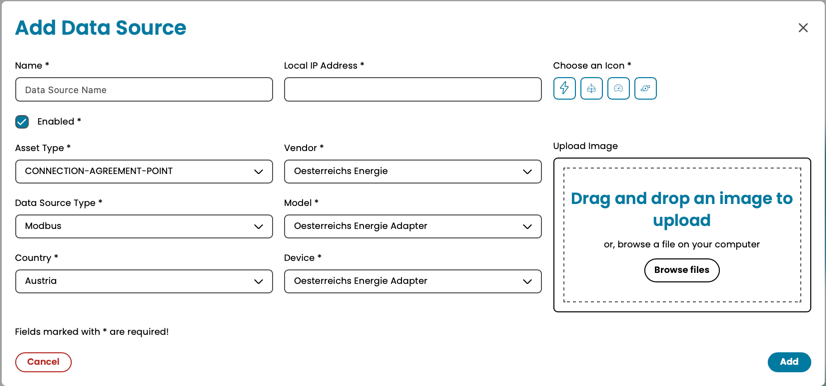
The same inputs have to be entered as described in the general data source documentation.
Additionally, the following parameters are needed to integrate Modbus TCP data sources:
Local IP Address: The IP address at which the Modbus TCP device is reachable.Vendor: The vendor of the device to integrate.Model: The model of the device to integrate.Device: The device version of the selected model.
Connect with AIIDA
AIIDA can connect seamlessly with the selected Modbus TCP data source as long as the following conditions are met:
- The Modbus TCP device is reachable from the AIIDA instance (i.e., both are accessible within the same TCP network).
- The Modbus TCP device is configured with the correct IP address.
Additional things to consider
Even when configuration files are created with great care, the following issues or limitations may still occur on a per-device basis:
- Some devices limit the number of simultaneous clients (often to one). In such cases, a connection attempt will be refused if another client is already connected.
- Configurations are based on factory-default device settings. If local device settings have been modified, the connection behavior may differ.
- The polling interval defined in the configuration file helps prevent communication issues caused by overly frequent data requests that the device cannot handle.
- It is recommended to assign a static IP address to the Modbus TCP device to prevent connectivity issues caused by IP changes when using DHCP.