
Database
AIIDA uses a TimescaleDB as its primary database. It was chosen because it is a relational database (PostgreSQL) optimized for time-series data.
Configuration
NOTE
We recommend using the files provided in the docker folder when using TimescaleDB.
The following values in the .env file adapt the database:
| Environment Variable | Description |
|---|---|
| SPRING_DATASOURCE_DATABASE | The name of the database. This name is used when the database is first created. |
| SPRING_DATASOURCE_USERNAME | The username AIIDA will use to connect to the database. This user is created on the first startup. |
| SPRING_DATASOURCE_PASSWORD | The password AIIDA will use to connect to the database. This password is used to create the user on the first startup. |
| EMQX_DATABASE_PASSWORD | The password for the emqx database user. |
EMQX User
EMQX requires a user with the username emqx to connect to the database. This user has limited privileges and is therefore only allowed to access the data_source table.
To create such a user on startup, create-emqx-user.sh is mounted as an init script in the timescaledb container in the compose.yml. This script create the user with username emqx with the value of the EMQX_DATABASE_PASSWORD environment variable as its password. If the variable is not set, the password will be blank.
Data Model
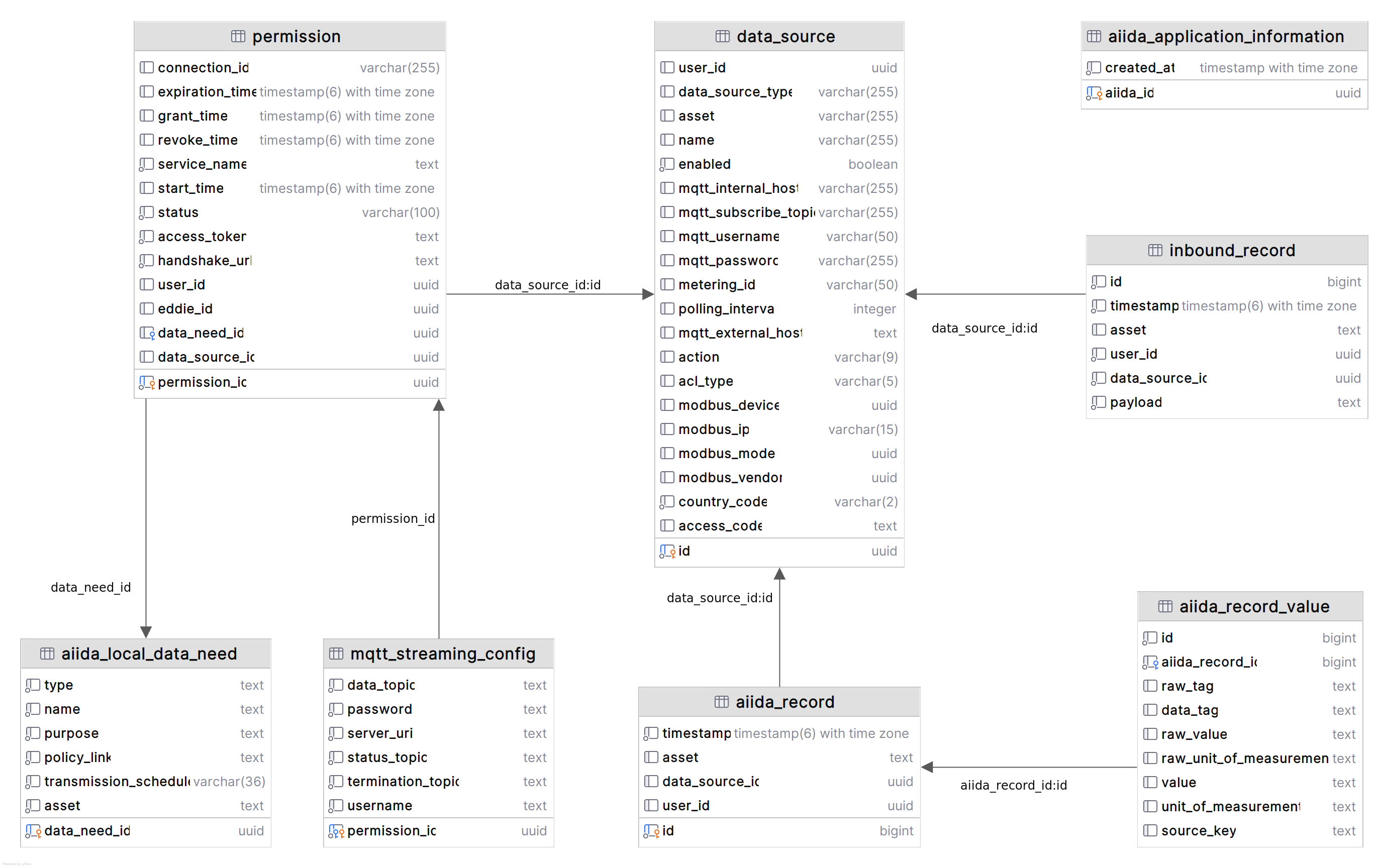
The figure above shows the relational data model of AIIDA's database. On the first start of the AIIDA application, a UUID is generated and stored in the aiida_application_information table.
AIIDA stores data sources and their configuration in the data_source table when a user adds one. After adding a data source, AIIDA starts receiving data from it and stores the data received in the aiida_record table.
Each aiida_record may contain multiple measurements, which are stored in the aiida_record_value table. When a user creates a permission for an Eligible Party (EP) to access their data, a new entry is created in the permission table. This permission is always associated with one data source.
For each permission, the given data need is stored locally as a copy in the aiida_local_data_need table. If the data need is MQTT-based, the MQTT configuration is stored in the mqtt_streaming_config table.
AIIDA's EMQX MQTT broker uses the data_source table to authenticate and authorize data sources when they connect to the broker. For each data source, a user is created in the data_source table with a username and password. Additionally, a dedicated topic is created for each data source. This user is both used by the virtual data source created by AIIDA and the physical data source (e.g., a smart meter or IoT device) to subscribe and publish to this topic.
Inbound data sources allow an EP to send data to AIIDA. The incoming payload is stored in the inbound_record table.