
Data Source: Common Information Model (CIM)
The CIM data source is a general purpose MQTT-based data source that allows to connect metering devices for which no data source adapter is implemented yet. The CIM data source uses the TimeSeries object from the Real Time Data Market Document.
The device which should be connected must be able to publish its data in the CIM format to an MQTT broker.
Integration with AIIDA
Data Source Configuration
Devices can send data to the MQTT broker of the AIIDA instance on the dedicated topic for the CIM Data Source.
{
  "version": "1.0",
  "registeredResource.mRID": {
    "value": "7d2b2547-27dd-4fe0-9516-707540e1184f",
    "codingScheme": "NAT"
  },
  "dateAndOrTime.dateTime": "2026-02-11T15:32:24Z",
  "Quantity": [
    {
      "quantity": 0.132,
      "type": "2",
      "quality": "AS_PROVIDED"
    },
    {
      "quantity": 65238.377,
      "type": "0",
      "quality": "AS_PROVIDED"
    }
  ]
}
Data of the original source must be parsed into the a TimeSeries JSON object with the following fields:
version: The version of the Time Series, currently always1.0.registeredResourceMRID: Identifies the data source which provided the data.value: The UUID of the data source which provided the data.codingScheme: The coding is based on the country the data source is located at.
dateAndOrTimeDateTime: The UTC timestamp of the dataquantities: An array of quantities with the following fields:quantity: The quantity value of the data.
type: The type of the quantity. See the table in the Real Time Data Market Document for supported types.quality: The quality of the quantity. See the table in the Real Time Data Market Documentfor supported qualities.
Setup in AIIDA
The same inputs have to be entered as described in the general data source documentation.
Connect with AIIDA
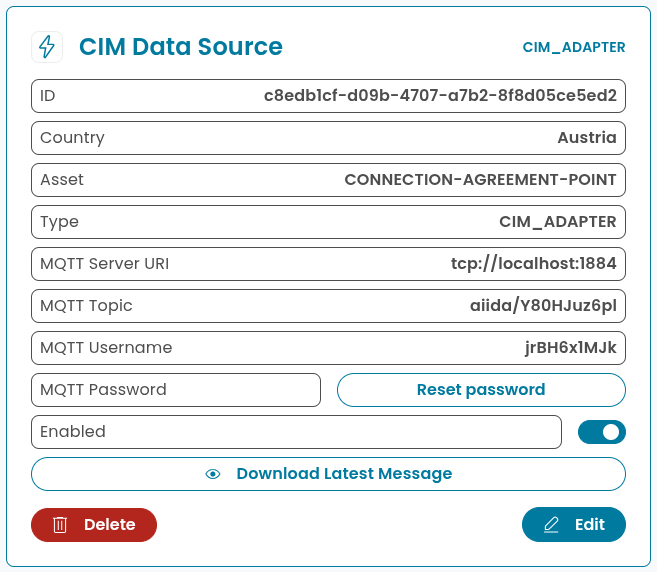
The device must be configured to publish the data in the CIM format to the MQTT broker of the AIIDA instance. AIIDA provides the broker URL, topic, username, and password:
Reference Implementations
Below are two reference implementations that show how to read data from different devices and publish it in the CIM format to AIIDA via MQTT.
Huawei Inverter (MQTT)
import asyncio
import json
import uuid
from datetime import datetime, timezone
from huawei_solar import HuaweiSolarBridge, AsyncHuaweiSolar, register_names as rn
import paho.mqtt.client as mqtt

mqtt_host="eddie-demo.projekte.fh-hagenberg.at"
mqtt_port=1883
mqtt_username=""
mqtt_password=""
mqtt_topic=""

async def main():
    first = True
    slave_id = 0
    client = await AsyncHuaweiSolar.create("192.168.200.1", 6607, slave_id)

    while True:
        if first == False:
            # If an error occured wait 15 seconds until retry, but dont wait on the very first run
            await asyncio.sleep(15)
        else:
            first = False

        try:
            mqttClient = mqtt.Client(client_id="fusion2000-python-client")
            mqttClient.username_pw_set(mqtt_username, mqtt_password)
            mqttClient.connect(mqtt_host, mqtt_port)

            while True:
                await fetchAndPublishData(client, slave_id, mqttClient)
                await asyncio.sleep(3)

        except Exception as e:
            mqttClient.disconnect()
            print(f"Error: {e}")


async def fetchAndPublishData(client, slave_id, mqttClient):
    results = await client.get_multiple([
                rn.POWER_METER_ACTIVE_POWER
            ], slave_id)

    active_power = results[0].value / 1000
    print(f"Active Power: {active_power} kW")

    now = datetime.now(timezone.utc).strftime("%Y-%m-%dT%H:%M:%SZ")
    raw_message = {
            "version": "1.0",
            "registeredResource.mRID": {
              "value": "AT0031000000000000000000198159000",
              "codingScheme": "NAT"
            },
            "dateAndOrTime.dateTime": now,
            "Quantity": [
              {
                "quantity": active_power,
                "type": "2",
                "quality": "AS_PROVIDED"
              }
            ]
          }

    message = json.dumps(raw_message)

    mqttPublishResult = mqttClient.publish(mqtt_topic, message)

    if mqttPublishResult[0] != 0:
        raise Exception("Failed to publish MQTT message!")
DIY Smart Meter Reading Device (REST to MQTT)
import asyncio
import json
import uuid
import requests
from datetime import datetime, timezone
import paho.mqtt.client as mqtt
mqtt_host="eddie-demo.projekte.fh-hagenberg.at"
mqtt_port=1883
mqtt_username=""
mqtt_password=""
mqtt_topic=""
url="http://x.x.x.x/rest"

async def main():
    while True:
        try:
            mqttClient = mqtt.Client(client_id="diy-smart-meter-reader-client")
            mqttClient.username_pw_set(mqtt_username, mqtt_password)
            mqttClient.connect(mqtt_host, mqtt_port)
            while True:
                await fetchAndPublishData(mqttClient)
                await asyncio.sleep(3)
        except Exception as e:
            mqttClient.disconnect()
            print(f"Error: {e}")

async def fetchAndPublishData(mqttClient):
    response = requests.get(url)
    if response.status_code == 200:
        data = response.json()
        active_instantaneous_power = data.get("1.7.0")/1000
    else:
        print("Error:", response.status_code)

    now = datetime.now(timezone.utc).strftime("%Y-%m-%dT%H:%M:%SZ")
    raw_message = {
            "version": "1.0",
            "registeredResource.mRID": {
              "value": "AT0030000000000000000000000XXXXXXX",
              "codingScheme": "NAT"
            },
            "dateAndOrTime.dateTime": now,
            "Quantity": [
              {
                "quantity": active_instantaneous_power,
                "type": "2",
                "quality": "AS_PROVIDED"
              }
            ]
          }
    message = json.dumps(raw_message)
    mqttPublishResult = mqttClient.publish(mqtt_topic, message)
    if mqttPublishResult[0] != 0:
        raise Exception("Failed to publish MQTT message!")

if __name__ == "__main__":
    asyncio.run(main())